How to test your headphones
- Turn your device volume down to about a third, then put your headphones on. L goes on the left ear and R on the right.
- Run the left / right test. Each chime should be clearly in one ear only.
- Play the stereo panning sweep. The sound should glide smoothly from ear to ear through the center of your head.
- Try the polarity test, then the bass test and frequency sweep to check sound quality.
- Finish with the music test sound and listen for crackling, buzzing or rattling.
The left right headphone test and the stereo test are the most important; the rest checks sound quality. All the testing works in your browser with no app. If everything sounds right, your headphones are working. The whole headphone sound test takes about a minute. It’s a free audio test online that runs in any browser on desktop or mobile, whatever your operating system.
Left right headphone test: what can go wrong
Stereo headphones have two separate drivers, one for each of the left and right channels. When the left/right test sounds wrong, the cause is almost always one of these:
- Left sounds play in both ears: your device has the mono audio setting turned on. It’s in Windows Settings › Accessibility › Audio, macOS System Settings › Accessibility › Audio, and the accessibility settings on iPhone and Android.
- One side is quieter: check the balance slider in your system sound settings (Windows: Sound › device properties; macOS: Sound › Output › Balance; phones: Accessibility › Audio balance). Earwax or a dirty mesh on earbuds is another common culprit.
- Sound swapped: the headphones are on backwards, or a cable adapter or app is reversing the channels.
- No sound at all: your computer may be sending audio to a different output device. Pick your headphones in the sound settings of your operating system.
- One side silent: a loose plug, a broken cable near the jack, or a dead earbud. Wiggle the cable gently while the chime plays; crackling or cut-outs point to a damaged wire.
Spatial audio and virtual surround features can make the left/right test sound like it’s coming from around you rather than directly in one ear. Turn spatial audio off while testing.
Polarity (phase) test explained
Each headphone driver pushes air out and pulls it back in. If both drivers move together, a centered sound appears in the middle of your head: that’s the in-phase signal. The out-of-phase button deliberately inverts the phase signal in the right channel, so the drivers move in opposite directions. It should sound strangely wide, hollow and hard to place, often with less bass.
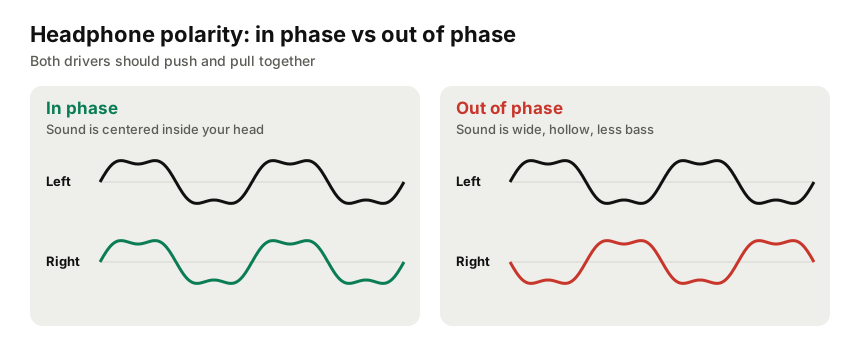
If the in-phase noise already sounds like that, one driver in your headphones has reversed speaker wiring (polarity), which is rare but happens with repairs, cheap cables and some adapters. The stereo panning test complements this by checking stereo separation: the sound should travel cleanly from one ear to the other.
Bass test and frequency response
Frequency response describes how evenly headphones play every frequency from deep bass to the highest treble. Closed-back over-ear headphones and in-ear monitors with a good seal can reproduce deep bass down to 20 Hz. Open-back headphones and loose earbuds lose bass when the seal leaks. Pushing earbuds in a little further, or trying a different tip size, often brings the bass back.
The frequency sweep runs from 20 Hz to 20,000 Hz. Most good headphones play the whole range, so where the sweep fades at the top usually tells you more about your hearing than your headphones. Hearing above 15–17 kHz declines naturally with age. Listen for sudden peaks, dips, or a frequency where the headphones buzz. For more frequency tests, use the tone generator to hold any single frequency.
Bluetooth headphones and headset test
The test works the same with Bluetooth headphones as with wired headphones. Two Bluetooth quirks to know:
- Headset mode sounds muffled: when a Bluetooth headset’s microphone is active, many systems switch to a low-quality “hands-free” profile. In your sound settings, choose the “Stereo” or “Headphones” output instead of “Headset” for proper sound.
- Slight delay: Bluetooth adds latency, so test sounds may start a moment after you press the button. That’s normal.
For gaming headsets, also check the headset’s own software; equalizer presets and virtual 7.1 surround can change what you hear in the left/right and bass tests. Testing the headset microphone? Speak into our voice Hz test to confirm the mic picks up your voice.
Signs you need new headphones
- Crackling, buzzing or rattling in one ear at moderate volume, especially during the bass test.
- One side cuts out when you move the cable.
- Noticeably weaker bass or volume on one side even with the balance centered and the ear tips cleaned.
Testing speakers instead of headphones? Use the speaker test.
Frequently asked questions
How do I know if my headphones are working properly?
Run the left/right test: each chime should play only in the matching ear. Then play the stereo sweep, which should move smoothly from ear to ear, and the bass test. If all three sound right and there’s no crackling, buzzing or rattling, your headphones are working.
Why do I hear left sounds in both ears?
The mono audio setting is probably on. Turn off Mono Audio in Windows (Settings › Accessibility › Audio), macOS (Accessibility › Audio) or your phone’s accessibility settings. Also check that the balance slider is centered and spatial audio is off for testing.
What does the polarity (phase) test show?
In-phase noise should sound centered inside your head. The out-of-phase version flips one channel and should sound vague and spread out. If your headphones make the in-phase signal sound wide and hollow, one driver may be wired with reversed polarity.
Do Bluetooth headphones pass the test?
Yes, the headphone test works with Bluetooth headphones and headsets as well as wired headphones. Bluetooth adds a little delay, so sounds may start a fraction of a second late. That’s normal. If a Bluetooth headset sounds muffled, switch it from “headset/hands-free” mode to “stereo” in your sound settings.
How low should good headphones go?
Most good headphones reproduce deep bass down to 20–30 Hz when they seal well around or in your ears. Open-back and earbud designs that don’t seal usually roll off around 50–60 Hz.