How to use the online pitch detector
- Press Start listening and allow microphone access when your browser asks.
- Sing, hum or play one steady note. An open vowel like “ooh” or “ahh” gives the cleanest reading.
- Read the note name and octave (for example A3), the frequency in Hz, and the tuning needle.
- Adjust until the needle is centered. When the detector reads green, you are within 10 cents of the note.
- Watch the pitch history graph to see glides, vibrato and how steadily you hold a note.
The detector also remembers the lowest and highest notes it heard clearly, so a few slow slides up and down give you a quick look at your range. For a guided singing exercise with a target note, try What Note Am I Singing.
Detecting pitch from audio files
Have a recording instead? Choose Or analyze an audio file and pick an MP3, WAV, M4A, OGG or FLAC file. The file plays in your browser while the detector shows each note as it happens, just like with the microphone. It’s a quick way to find the notes of a voice memo, a practice recording or a single-instrument melody. The file is decoded locally and never uploaded.
Pitch detector, note finder, pitch finder: one tool
People search for this kind of tool under many names: pitch detector, note finder, pitch finder, note detector, pitch identifier or pitch recognizer. They all do the same job: listen to a sound, measure its musical pitch, and tell you which note it is. This one is browser-based, so there’s nothing to download. It runs on desktop, laptop, iPhone, iPad and Android in Chrome, Safari, Edge or Firefox.
You don’t need perfect pitch (absolute pitch) to name a note anymore. Only a small fraction of people can identify a note by ear without a reference. A note finder gives everyone else the same answer instantly, and using one regularly is a practical form of ear training: over time you start to recognize notes and intervals on your own.
Reading the results: note, frequency and cents
Note name and octave
Notes are shown in scientific pitch notation: a letter name (C, D, E, F, G, A, B, with ♯ sharps or ♭ flats) followed by an octave number. Middle C on the piano is C4, and the A above it, the note orchestras tune to, is A4. The octave number goes up by one every time you pass a C, so B3 is directly followed by C4. Prefer Do Re Mi? Switch the note names to solfège in the settings.
Frequency in hertz (Hz)
Frequency is how many times per second the sound wave repeats. A4 vibrates 440 times per second (440 Hz). Every octave doubles the frequency, so A5 is 880 Hz and A3 is 220 Hz. The detector displays the measured fundamental frequency, the lowest and usually strongest repeating component of the sound.
Cents: how sharp or flat you are
A cent is one hundredth of a semitone, the smallest step on the piano. The needle shows the distance from the nearest equal-tempered note, from −50 cents (flat) to +50 cents (sharp). As a rule of thumb, most listeners can’t hear errors below about 5 cents on a sustained note, trained musicians notice 10–15 cents, and anything past 20–25 cents sounds clearly out of tune.
The pitch history graph
The scrolling graph plots your pitch over the last few seconds against a grid of semitones. A flat line means a steady note; a regular wave is vibrato; a curve that starts low and rises is a scoop. Singers use it to check intonation on long notes and to see whether they land on pitch or slide into it.
How pitch detection works
Almost every musical sound is made of a fundamental frequency plus a series of harmonics (overtones) at whole-number multiples of it: 2×, 3×, 4× and so on. The balance of those harmonics is what makes a violin, a trumpet and your voice sound different even on the same note. That balance is called timbre. A pitch detector has to look past the timbre and find the fundamental.
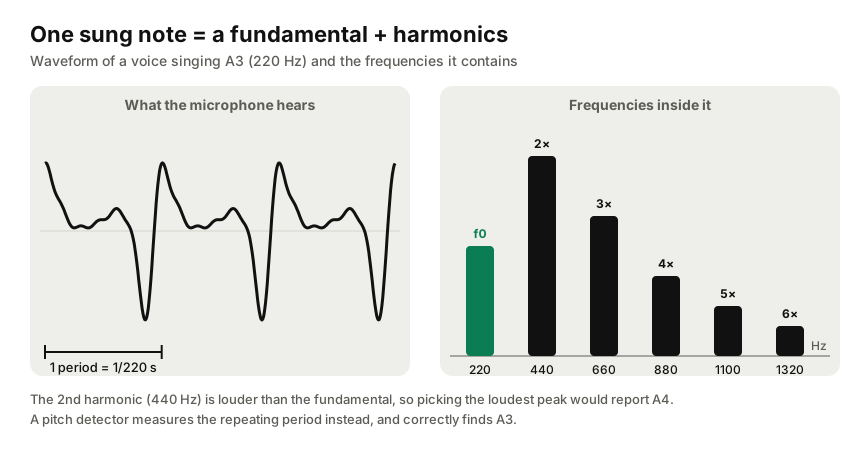
A pitch detection algorithm has two jobs: estimate the fundamental frequency from the raw sound waves, then map it to the nearest note in your tuning system. The first job is the hard part. Simply picking the loudest peak in a frequency spectrum (an FFT) often fails, because in a human voice the second or third harmonic is frequently louder than the fundamental. Sometimes the fundamental is almost missing entirely, yet our ears still hear the right pitch. So instead this tool works in the time domain: it measures how similar the waveform is to a delayed copy of itself. When the delay equals one full period of the wave, the similarity peaks. This is the idea behind autocorrelation, and the specific method used here, the McLeod Pitch Method (a normalized square difference function), is designed to stay accurate on voices and acoustic instruments and to avoid octave errors.
Each analysis window holds about 40 milliseconds of audio, and the result is refined with parabolic interpolation and smoothed with a short median filter. That keeps the display stable while still updating in real time, around 60 times per second, with no noticeable lag. The Web Audio API built into your browser supplies the microphone signal, so all of this happens on your device. Bright, high-frequency overtones, such as the “s” and “t” sounds in speech or the attack of a plucked string, are filtered out because they don’t repeat at a steady period. Readings below a clarity threshold, such as noise, breath or several notes at once, are ignored rather than shown as a random note.
Pitch, frequency, note and tone: what’s the difference?
- Frequency is the physical rate of vibration, measured in hertz.
- Pitch is how high or low we perceive a sound. For musical tones it tracks the fundamental frequency very closely.
- Note is the name we give a pitch within a tuning system, like F♯3.
- Tone can mean a sound with a definite pitch, the quality of a sound (timbre), or a whole-step interval, depending on context.
Loudness does not change the note. A soft A4 and a loud A4 have the same frequency, though very loud singing sometimes drifts sharp.
Note frequency chart (C2 to C6)
Frequencies below use 12-tone equal temperament with A4 = 440 Hz. Each note is calculated as f = 440 × 2^((n − 69) / 12), where n is the MIDI note number. Wavelengths assume sound traveling at 343 m/s in room-temperature air.
| Note | Frequency (Hz) | Wavelength (cm) | MIDI # |
|---|---|---|---|
| C2 | 65.41 | 524.4 | 36 |
| C♯2 / D♭2 | 69.30 | 495.0 | 37 |
| D2 | 73.42 | 467.2 | 38 |
| D♯2 / E♭2 | 77.78 | 441.0 | 39 |
| E2 | 82.41 | 416.2 | 40 |
| F2 | 87.31 | 392.9 | 41 |
| F♯2 / G♭2 | 92.50 | 370.8 | 42 |
| G2 | 98.00 | 350.0 | 43 |
| G♯2 / A♭2 | 103.83 | 330.4 | 44 |
| A2 | 110.00 | 311.8 | 45 |
| A♯2 / B♭2 | 116.54 | 294.3 | 46 |
| B2 | 123.47 | 277.8 | 47 |
| C3 | 130.81 | 262.2 | 48 |
| C♯3 / D♭3 | 138.59 | 247.5 | 49 |
| D3 | 146.83 | 233.6 | 50 |
| D♯3 / E♭3 | 155.56 | 220.5 | 51 |
| E3 | 164.81 | 208.1 | 52 |
| F3 | 174.61 | 196.4 | 53 |
| F♯3 / G♭3 | 185.00 | 185.4 | 54 |
| G3 | 196.00 | 175.0 | 55 |
| G♯3 / A♭3 | 207.65 | 165.2 | 56 |
| A3 | 220.00 | 155.9 | 57 |
| A♯3 / B♭3 | 233.08 | 147.2 | 58 |
| B3 | 246.94 | 138.9 | 59 |
| C4 (middle C) | 261.63 | 131.1 | 60 |
| C♯4 / D♭4 | 277.18 | 123.7 | 61 |
| D4 | 293.66 | 116.8 | 62 |
| D♯4 / E♭4 | 311.13 | 110.2 | 63 |
| E4 | 329.63 | 104.1 | 64 |
| F4 | 349.23 | 98.2 | 65 |
| F♯4 / G♭4 | 369.99 | 92.7 | 66 |
| G4 | 392.00 | 87.5 | 67 |
| G♯4 / A♭4 | 415.30 | 82.6 | 68 |
| A4 (A440) | 440.00 | 78.0 | 69 |
| A♯4 / B♭4 | 466.16 | 73.6 | 70 |
| B4 | 493.88 | 69.4 | 71 |
| C5 | 523.25 | 65.6 | 72 |
| C♯5 / D♭5 | 554.37 | 61.9 | 73 |
| D5 | 587.33 | 58.4 | 74 |
| D♯5 / E♭5 | 622.25 | 55.1 | 75 |
| E5 | 659.26 | 52.0 | 76 |
| F5 | 698.46 | 49.1 | 77 |
| F♯5 / G♭5 | 739.99 | 46.4 | 78 |
| G5 | 783.99 | 43.8 | 79 |
| G♯5 / A♭5 | 830.61 | 41.3 | 80 |
| A5 | 880.00 | 39.0 | 81 |
| A♯5 / B♭5 | 932.33 | 36.8 | 82 |
| B5 | 987.77 | 34.7 | 83 |
| C6 | 1046.50 | 32.8 | 84 |
Reference pitch: A440, A442, A432 and A415
A440 (A4 = 440 Hz) is the international standard concert pitch and the default here. Many European orchestras tune slightly higher, to A442 or A443, for a brighter sound. Baroque ensembles playing period instruments often use A415, roughly a semitone lower. Some musicians prefer A432 for personal or aesthetic reasons. If you’re playing along with a recording or a group that uses a different standard, change the Reference pitch setting and every note and cents reading will follow it.
What you can use a pitch detector for
Singing and vocal training
See whether you’re hitting the note dead center, sliding into it, or drifting flat at the end of a phrase. Track the lowest and highest notes you can sing comfortably to understand your vocal range and voice type, or take the guided vocal range test.
Tuning instruments
Use it as a chromatic tuner for guitar, bass, ukulele, violin, viola, cello, mandolin, banjo and more: play one string at a time and tune until the needle reads 0. For guitar in standard tuning, the open strings are E2, A2, D3, G3, B3 and E4. Prefer tuning by ear? Play a reference pitch with the online tone generator.
Wind and brass players
The detector always shows concert pitch. On a transposing instrument such as a B♭ trumpet, clarinet or tenor saxophone, the note you read on the page will be different from what appears here. For example, a written C on a B♭ trumpet sounds as B♭.
Finding a note in a song
Play a recording near the microphone, or hum the melody back, to identify individual notes. This is handy for working out a song’s key or transcribing a melody by ear. It works best on one clear melodic line, not full chords.
Ear training
Sing an interval or scale and check each note visually. Over time you’ll learn to hear the difference between in tune and slightly sharp or flat.
Tips for accurate pitch readings
- Use a quiet room and keep the microphone 10–30 cm (4–12 in) from your mouth or instrument.
- Sing or play one note at a time. Chords contain several fundamentals and can’t be read as a single pitch.
- Hold each note for at least half a second so the reading can settle.
- If readings jump around, lower the Mic sensitivity. If quiet notes aren’t detected, raise it.
- Turn off “voice isolation” or noise-reduction effects on your system microphone if available, since they can distort pitch.
- Wear headphones when playing a backing track so the detector hears only you.
Your audio stays on your device
All pitch analysis runs locally in your browser using the Web Audio API. Nothing you sing or play is recorded, saved or uploaded. Close the page or press Stop listening and the microphone is released immediately.
Frequently asked questions
How accurate is this online pitch detector?
On a steady sung or played note the detector is accurate to within a few cents, which is finer than most people can hear. Accuracy drops with background noise, very breathy tones and fast vibrato, so use a quiet room and hold the note for a moment.
Is my audio recorded or uploaded?
No. The pitch detector analyzes the microphone signal inside your browser. Nothing is recorded, stored or sent to a server.
What range of notes can it detect?
It detects fundamental frequencies from about 55 Hz (A1) up to about 1,600 Hz (around G6). That covers the full range of the human voice and the main range of guitar, bass, violin, cello, ukulele, piano and most wind instruments.
Why does the detector show the wrong octave sometimes?
Octave jumps happen when an overtone is louder than the fundamental, which is common with bright instruments or very low voices. Moving closer to the microphone, singing an open vowel like “ah”, or playing a little softer usually fixes it.
Can I use it as a tuner?
Yes. Play one string or note at a time and adjust until the needle sits at 0 cents and the note turns green. You can change the reference pitch from A440 to A442, A432 or A415 to match your ensemble.
Does it work on iPhone and Android?
Yes. It works in Safari on iPhone and iPad and in Chrome on Android. Tap Start listening and allow microphone access when your browser asks.
Can I find the pitch of an audio file or song?
Yes. Click “Or analyze an audio file” and choose an MP3, WAV, M4A, OGG or FLAC file. The note finder shows each note as the file plays. It works best on recordings of a single voice or instrument; full mixes with chords and drums give less reliable readings.
What is the difference between pitch and frequency?
Frequency is a physical measurement of how many times a sound wave repeats per second, in hertz. Pitch is how high or low we perceive that sound. For musical tones, pitch closely follows the fundamental frequency, so a pitch detector measures frequency and converts it to the nearest note.